The best smart plug with power usage tracking does more than turn appliances on and off. It can show how much electricity a device uses, help identify energy waste, and support schedules that make everyday routines easier.
We compared 10 energy-monitoring smart plugs across connectivity, platform support, outlet design, ratings, and automation features to help you choose the right option for individual appliances, power strips, and whole-home setups.
Best 10 Smart Plug with Power Usage Tracking Picks for 2026
Best Compact Pick

- Tracks energy use in the Kasa app
- Works with Alexa and Google Assistant
- Includes overheating and child safety features
Best For: Monitoring one appliance with a compact plug
Best for Home Offices
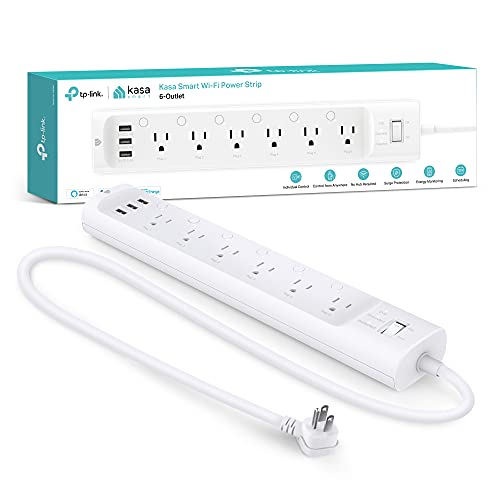
- Controls six outlets independently
- Tracks energy use per connected outlet
- Includes three USB ports and surge protection
Best For: Managing multiple electronics in one area
Best Energy-Management Features
Tapo P115 Energy-Monitoring 2-Pack

- Shows usage charts and estimated energy costs
- Supports schedules and off-peak operation
- Includes overload shutoff and smart charging
Best For: Using energy data to guide schedules and savings
Best for Long-Term Usage History
Govee H5086 Energy-Monitoring 2-Pack

- Tracks power, current, and voltage in real time
- Keeps usage data for up to one year
- Supports schedules, groups, and voice control
Best For: Comparing appliance consumption over time
Best for Long-Range Monitoring

- Real-time and exportable energy reports
- 15A/1,800W support with overload protection
- Long-range LoRa control and cycle schedules
Best For: High-load appliances and extended-range YoLink setups
Best for Zigbee Home Systems
Aqara Smart Plug with Energy Monitoring

- Tracks connected-appliance consumption
- Supports schedules, timers, scenes, and remote control
- Repeats Zigbee signals and supports 15A loads
Best For: Aqara smart homes needing energy tracking and mesh expansion
Best Matter Two-Pack

- Two compact plugs with energy monitoring
- Matter support across major smart-home platforms
- 15A/1,800W rating and local LAN control
Best For: Multi-platform homes needing two monitored outlets
Best Compact Energy Monitor

- Second-by-second energy monitoring with data export
- Wi-Fi setup with Bluetooth fallback connectivity
- Compact 1-inch design and overload protection
Best For: Crowded outlets and detailed appliance energy analysis
Best Matter Four-Pack

- Matter-certified for major smart-home platforms
- Detailed energy statistics and estimated bill tracking
- Threshold shutoff, scheduling, and four-plug pack
Best For: Multi-room energy management with Matter
Best Single Plug With Cost Tracking

- Tracks real-time usage and electricity costs
- Matter support across major smart-home platforms
- 15A rating with overload and fire protection
Best For: Single-appliance monitoring with Matter control
Best Compact Pick – Kasa Smart Plug Mini KP115
The Kasa KP115 is a practical smart plug with power usage tracking for individual appliances. Its Kasa app provides remote control, while Alexa and Google Assistant support adds convenient voice operation. A 2.4GHz Wi-Fi connection is required.
Best For: Tracking and controlling one appliance at a time in bedrooms, offices, or living spaces.
Pros:
- Monitors energy use through the Kasa app.
- Supports remote control and Alexa or Google Assistant voice commands.
- Includes overheating protection, a fire-resistant shell, and a child safety cover.
- UL certified and backed by a two-year warranty.
Cons:
- Requires a 2.4GHz Wi-Fi connection.
- Provides one controlled outlet rather than multiple outlets.
The KP115 is a straightforward choice when you want energy monitoring, app access, and voice control in a compact single-outlet design.
Best for Home Offices – Kasa Smart Power Strip HS300
The Kasa HS300 expands smart control across a workspace or entertainment area with six independently controlled outlets. It also functions as a smart plug with power usage tracking, letting you monitor connected devices individually in the Kasa app.
Best For: Home offices, media centers, and small businesses with several devices to manage.
Pros:
- Offers six independently controlled smart outlets.
- Tracks energy consumption for each connected outlet through the Kasa app.
- Adds three USB charging ports and ETL-certified surge protection.
- Supports remote app control and voice commands through Alexa, Google Assistant, or Cortana.
Cons:
- Its total load is limited to 15A or 1,875W.
- The larger power-strip format is less suitable for a single appliance or tight spaces.
Choose the HS300 when multiple devices need separate schedules, controls, and energy readings rather than a single smart outlet.
Best Energy-Management Features – Tapo P115 Energy-Monitoring 2-Pack
The Tapo P115 two-pack is a smart plug with power usage tracking aimed at more detailed energy management. Its app presents usage statistics and charts, supports bill-cost estimates, and can schedule devices to run during lower-rate periods.
Best For: Households that want two monitored outlets plus scheduling and cost-focused energy insights.
Pros:
- Includes two 15A smart plugs.
- Provides energy statistics, charts, and estimated bill costs in the Tapo app.
- Supports scheduling for off-peak operation and automatic overload shutoff.
- Adds smart charging to stop power at a selected low-battery limit.
Cons:
- The supplied notes do not specify compatibility beyond the Tapo app, Alexa, and Google Assistant.
- Its more advanced energy features may be unnecessary for basic on/off control.
The P115 is a strong fit for buyers who want energy data to inform schedules and potential savings, with two plugs included in the package.
Best for Long-Term Usage History – Govee H5086 Energy-Monitoring 2-Pack
The Govee H5086 two-pack combines real-time readings with extended usage history, making it a useful smart plug with power usage tracking for comparing consumption over time. The Govee Home app records daily, weekly, and monthly data for up to one year.
Best For: Tracking appliance power, current, and voltage over longer periods while controlling devices remotely.
Pros:
- Tracks real-time power, current, and voltage.
- Stores daily, weekly, and monthly data for up to one year.
- Supports schedules, timers, group control, and remote access.
- Works with Alexa and Google Assistant and uses Wi-Fi plus Bluetooth connectivity.
Cons:
- Does not support 5GHz Wi-Fi.
- The supplied notes list FCC certification, while ETL certification is mentioned in the product features; certification details should be verified before purchase.
Govee stands out for buyers who value detailed historical records and want two outlets for scheduled, voice-controlled appliance management.
Best for Long-Range Monitoring – YoLink Smart Energy Plug
The YoLink Smart Energy Plug is a practical smart plug with power usage tracking for appliances that need detailed schedules or higher-load support. It monitors live wattage, provides exportable usage reports, and supports devices up to 15 amps. Keep in mind that a YoLink Hub is required for energy monitoring, remote access, and automation.
Best For: Fans, pumps, dehumidifiers, heaters, and other appliances in locations where long-range YoLink connectivity is useful.
Pros:
- Tracks real-time power use and supports exportable historical reports.
- Supports up to 15 amps or 1,800 watts for higher-power appliances.
- Offers cycle schedules, overload protection, and compatibility with Alexa, Google Assistant, IFTTT, and Home Assistant.
- YoLink LoRa provides communication up to 2,034 feet in open air.
Cons:
- Requires a YoLink Hub, sold separately.
- Its IP00 rating does not indicate protection from water or dust.
This is a strong choice when energy reporting and flexible recurring schedules matter more than a hub-free setup. The combination of overload protection, high-load support, and long-range communication makes it particularly useful for utility areas or outbuildings within a YoLink system.
Best for Zigbee Home Systems – Aqara Smart Plug with Energy Monitoring
The Aqara Smart Plug is a smart plug with power usage tracking designed for Aqara-based homes. It monitors connected-appliance consumption, supports schedules, timers, and scenes, and can handle loads up to 15 amps. An Aqara Hub and a compatible 2.4 GHz Wi-Fi connection for that hub are required.
Best For: Aqara users who want energy monitoring plus Zigbee mesh expansion for sensors, lights, and locks.
Pros:
- Monitors the power consumption of connected appliances.
- Supports schedules, timers, scenes, and remote control through the Aqara Home app.
- Handles appliances up to 15 amps, including window air conditioners and space heaters.
- Acts as a Zigbee signal repeater to help expand the mesh network.
Cons:
- Requires an Aqara Hub, sold separately.
- Hub setup requires a secured compatible Wi-Fi network.
The Aqara plug is most compelling when you already use Aqara devices and want one outlet to provide both energy data and Zigbee network support. It is less suitable for buyers seeking a standalone plug without an additional hub.
Best Matter Two-Pack – Kasa KP125MP2 Smart Plug
The Kasa KP125MP2 is a convenient smart plug with power usage tracking for shoppers who want two outlets and broad Matter compatibility. It records energy usage over time, supports loads up to 15 amps or 1,800 watts, and works with Apple Home, Alexa, Google Home, and Samsung SmartThings through supported Matter platforms.
Best For: Multi-platform smart homes that need two compact Wi-Fi plugs with energy monitoring and local Matter control.
Pros:
- Includes two plugs and tracks energy usage over time.
- Supports Matter platforms including Apple Home, Amazon Alexa, Google Home, and Samsung SmartThings.
- Can continue local-network Matter control when the home internet is offline.
- Compact, UL-certified flame-retardant design with a two-year limited warranty.
Cons:
- Energy data and automation depend on the supported app and Matter platform setup.
- The supplied specifications list Wi-Fi connectivity but do not state a hub-free energy-monitoring workflow for every platform.
This two-pack is a sensible option for households standardizing on Matter or managing multiple appliances. Its main advantages are cross-platform compatibility, local-network operation, and the value of getting two energy-monitoring outlets together.
Best Compact Energy Monitor – SwitchBot Smart Plug Mini
For shoppers seeking a smart plug with power usage tracking, the SwitchBot Smart Plug Mini combines second-by-second energy monitoring with a compact, non-blocking design. Wi-Fi handles setup, while Bluetooth provides fallback connectivity if your network becomes unstable.
Best For: Users who want detailed appliance monitoring, compact plugs for crowded outlets, and broad smart-home compatibility.
Pros:
- Real-time power tracking updates every second and supports data export.
- Works with Alexa, Google Assistant, Siri, SmartThings, and Home Assistant.
- Compact 1-inch design helps preserve access to adjacent outlets.
- Includes overload protection and ETL-certified safety features.
Cons:
- The supplied listing describes the pack as four items, but its included-components note says “plug*3,” so buyers should verify package contents.
- Bluetooth fallback is useful, but Wi-Fi is still required for initial setup.
This is a strong choice when outlet space and frequent energy updates matter. Its exportable readings are particularly useful for analyzing appliances such as washers and dryers over time.
Best Matter Four-Pack – Tapo P110M Smart Plug
The Tapo P110M is a smart plug with power usage tracking designed for households managing several devices. Its Matter certification supports major platforms, while the Tapo app provides energy statistics, scheduling, and estimated bill information.
Best For: Multi-room smart-home setups that need Matter compatibility, energy insights, and programmable schedules across four outlets.
Pros:
- Matter-certified for compatibility with Alexa, Apple HomeKit, Google Home, and SmartThings.
- Offers detailed energy statistics, visualizations, and estimated electricity costs.
- Schedules can help operate compatible devices during off-peak electricity periods.
- Supports threshold-based shutoff and remote or voice control.
Cons:
- The larger 1.5 x 1.5 x 2.6-inch dimensions may occupy more outlet space than compact models.
- Cost visualization depends on integrating the plug with billing systems.
With four plugs included, this model is well suited to expanding a connected home. Its combination of Matter support and energy-cost features makes it a practical option for users who want both interoperability and consumption planning.
Best Single Plug With Cost Tracking – SONOFF S61s Matter Smart Plug
The SONOFF S61s is a smart plug with power usage tracking that reports real-time consumption and electricity costs through a compatible smart-home app. It connects over 2.4GHz Wi-Fi without a hub and supports Matter-based control alongside eWeLink features.
Best For: Users who need one 15A outlet for everyday appliances and want energy-cost tracking in Apple Home, Alexa, Google Home, or SmartThings.
Pros:
- Tracks real-time power usage and electricity costs.
- Matter over Wi-Fi works with Apple Home, Alexa, Google Home, and SmartThings.
- 15A capacity supports lamps, fans, heaters, and kitchen devices.
- Includes overload protection, fire-resistant housing, and a two-year warranty.
Cons:
- Only one plug is included, unlike the four-packs in this roundup.
- Requires a 2.4GHz Wi-Fi connection and does not include a hub.
- Its 2.36 x 1.5 x 2.13-inch body may be less compact than the SwitchBot option.
The S61s is a straightforward single-outlet solution for monitoring appliance costs while retaining Matter flexibility. Its 15A rating and safety protections make it suitable for many routine household loads, within the stated capacity.
How We Picked the Best Smart Plug with Power Usage Tracking
We focused on smart plugs that measure electricity use in addition to offering remote control and scheduling. The selection includes compact single outlets, multi-outlet power strips, two- and four-packs, and models built around Wi-Fi, Bluetooth, Zigbee, Matter, or specialized long-range connectivity.
We also considered electrical ratings, overload protection, hub requirements, app functionality, voice-assistant compatibility, and how easily each plug fits into an existing smart-home platform. Because energy data is only useful when it is easy to understand, monitoring and reporting features were part of the comparison—not just the ability to switch an appliance remotely.
Quick Comparison
- Best for a single appliance: A compact 15A plug such as the Kasa KP115 or SwitchBot Smart Plug Mini.
- Best for multiple devices: The Kasa HS300 power strip provides separately controlled outlets and energy monitoring.
- Best for multi-room coverage: Tapo and Govee multipacks offer several outlets in one purchase.
- Best for broad compatibility: Matter-compatible options from Kasa, Tapo, and SONOFF can simplify cross-platform setup.
- Best for hub-based systems: Aqara Zigbee and YoLink models may suit homes already using their respective ecosystems.
Key Buying Factors for a Smart Plug with Power Usage Tracking
Electrical Rating and Appliance Type
Most options here are rated for up to 15 amps and 1,800 watts, but confirm the plug’s specifications before connecting heaters, air conditioners, pumps, or other high-load appliances. A smart plug should not replace a properly rated heavy-duty control device.
Connectivity and Compatibility
Wi-Fi plugs usually avoid a separate hub, while Zigbee and some long-range systems require compatible hardware. Matter can improve cross-platform compatibility, but setup still depends on a supported controller and the right wireless network. Check support for Alexa, Google Home, Apple Home, Home Assistant, or your preferred platform before buying.
Energy Data and Automation
Look for clear current, daily, and historical usage readings if you want to track costs or identify standby consumption. Scheduling, timers, scenes, and usage-triggered routines can turn measurements into practical savings. Check whether energy history is stored locally, in the app, or behind any subscription.
Size, Outlets, and Safety
Compact designs are less likely to block adjacent sockets. A power strip is more useful when each outlet can be controlled independently. Overload protection, physical ratings, reliable construction, and a reset or manual-control button are valuable for everyday use.
Who Should Buy Which Smart Plug with Power Usage Tracking?
Choose a compact single plug for lamps, fans, coffee makers, and other individual devices. Buy a multipack when you want consistent control across several rooms. Select the Kasa power strip for desk or entertainment-center equipment that needs multiple independently managed outlets.
Matter models are a strong fit for households mixing smart-home platforms or planning to change ecosystems later. Aqara and YoLink options make more sense for users already invested in those hubs and sensors. If your priority is straightforward energy tracking without extra hardware, start with a hub-free Wi-Fi model and verify that its app provides the usage history you need.