The best video doorbells for elderly users make it easier to see and speak with visitors without opening the door. Large indoor monitors, simple controls, clear audio, and dependable local recording can be more valuable than complicated smart-home features.
Our selection includes wired and wireless systems, app-free options, no-subscription cameras, and models with screens that can be placed where they are easy to see. Use the guide below to match the right setup to the user’s comfort level, home layout, and internet access.
Best 10 Video Doorbells for Elderly Picks for 2026
Best Subscription-Free Pick

- 166° wide-angle coverage
- No required subscription
- App-based two-way audio
Best For: Families wanting broad, subscription-free porch monitoring
Best Built-In Monitor System
LUMOBELL 7-Inch Video Intercom

- Large 7-inch indoor screen
- Two-way audio and door release
- 32GB local storage included
Best For: Homes wanting a dedicated wired visitor monitor
Best No-Internet Option
TKMARS Wireless Doorbell with Monitor

- No Wi-Fi, app, or subscription needed
- 4.3-inch indoor monitor included
- 170° wide-angle view
Best For: Users wanting simple, standalone visitor checks
Best Smart Monitor Upgrade
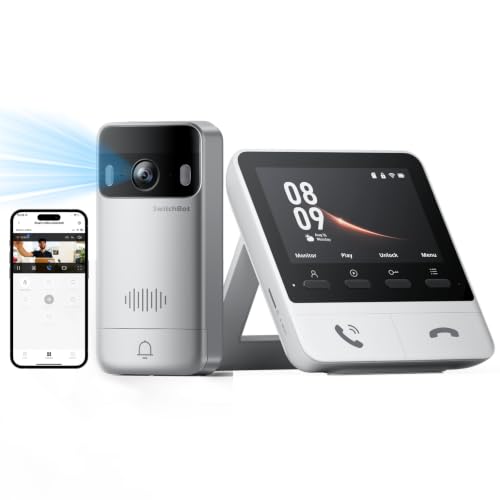
- 2K video with 165° view
- 4.3-inch monitor included
- Expandable and smart-lock compatible
Best For: Smart-home users wanting a higher-resolution monitor system
Simple App-Based Security

- Smartphone two-way audio and 1080p video
- AI human detection helps reduce false alerts
- Includes an indoor receiver and infrared night vision
Best For: App-based monitoring with an indoor chime
Dedicated Screen Convenience
SwitchBot Video Doorbell with Monitor

- 4.3-inch color monitor reduces reliance on a smartphone
- 2K video with 165-degree head-to-toe coverage
- Local 4GB storage with no required subscription
Best For: Seniors who prefer a dedicated indoor viewing screen
No-App Simplicity
Winnes Wireless Doorbell Camera

- Operates without Wi-Fi, an app, or subscription
- Includes a 4.3-inch monitor and two-way video talk
- 170-degree view with IP65 weather resistance
Best For: Simple, offline monitoring with a dedicated screen
Best Large-Screen Pick
7-Inch Wireless Video Doorbell System

- Large 7-inch 1080p touchscreen
- Wireless installation with no subscription
- Motion alerts and local TF-card storage
Best For: Older adults who prefer a large indoor monitor
Best No-Wi-Fi Pick
Wireless Doorbell Camera With Monitor

- No Wi-Fi or app required
- Pre-paired 4.3-inch monitor
- Includes 8GB local memory card
Best For: Seniors who want simple monitor-based visitor viewing
Best Smart-Alert Pick
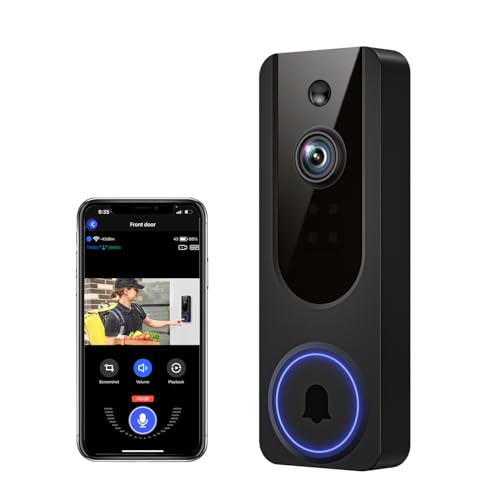
- AI human detection filters motion alerts
- Remote smartphone viewing and two-way talk
- No subscription needed for core features
Best For: Caregivers wanting remote alerts and communication
Best Subscription-Free Pick – BOIFUN 2K Wireless Doorbell
For shoppers comparing video doorbells for elderly users, the BOIFUN combines a wide view, phone-based two-way communication, human detection, and essential features without a required subscription. Its wireless installation and local microSD storage can simplify everyday front-door monitoring.
Best For: Older adults or families wanting a subscription-free doorbell with smartphone viewing and broad porch coverage.
Pros:
- 166° field of view helps cover the porch with fewer blind spots.
- Two-way audio, live viewing, and alerts work through the BoifunCam app.
- No subscription is required for alerts, human detection, two-way audio, or playback.
- Supports local storage with a microSD card up to 128GB.
Cons:
- Supports only 2.4 GHz Wi-Fi.
- The indoor viewing experience depends on using a smartphone.
- Battery life varies with motion activity and environmental conditions.
The BOIFUN is a practical choice when app access is comfortable and avoiding ongoing fees matters. Its built-in, non-removable battery means charging habits should be considered before installation.
Best Built-In Monitor System – LUMOBELL 7-Inch Video Intercom
This wired LUMOBELL system is a strong option among video doorbells for elderly users who may prefer viewing visitors on a dedicated indoor screen instead of a phone. Its 7-inch touchscreen, two-way audio, local recording, and optional door-release controls create a more complete entry setup.
Best For: Homes where a large indoor monitor and wired entry system are more convenient than relying primarily on a smartphone.
Pros:
- Large 7-inch HD touchscreen provides a clear indoor visitor view.
- 1080p video and a 130° lens support visitor identification.
- Two-way communication lets residents speak without opening the door.
- Includes a 32GB microSD card and supports local recording without a subscription.
Cons:
- Requires corded power and wall-mounted installation.
- Its advanced door-release features may require compatible 12V lock hardware.
- The wired setup may be less suitable for renters or locations where installation is difficult.
With its dedicated screen and local recording, the LUMOBELL reduces dependence on a phone. It is best suited to households prepared for a more involved, permanent installation.
Best No-Internet Option – TKMARS Wireless Doorbell with Monitor
The TKMARS stands out among video doorbells for elderly users because it does not require Wi-Fi, an app, or a subscription. The included 4.3-inch monitor shows visitors indoors, while push-to-talk audio keeps conversations simple and direct.
Best For: Older adults who want a straightforward doorbell camera with an indoor screen and no smartphone or home-internet requirement.
Pros:
- Works without Wi-Fi, an app, or a subscription.
- Included 4.3-inch IPS monitor displays visitors when the doorbell is pressed.
- 170° viewing angle provides broad entrance coverage.
- Stores ring-triggered photos internally and supports 8–32GB TF cards for video.
Cons:
- Push-to-talk audio requires holding the talk button and taking turns speaking.
- Wireless range can be reduced by walls, metal doors, and interference.
- Video recording requires adding a compatible TF card.
For users who prefer dedicated hardware over apps, the TKMARS keeps operation uncomplicated. Test the connection at the intended mounting locations before permanently installing it.
Best Smart Monitor Upgrade – SwitchBot 2K Doorbell Camera
For households seeking video doorbells for elderly users with a dedicated screen and smart-home flexibility, the SwitchBot pairs a 4.3-inch monitor with 2K video, a 165° view, local storage, and two-way communication. It can also work with compatible SwitchBot smart locks and Alexa.
Best For: Families wanting a monitor-based doorbell with sharper video, expandable screens, and optional smart-lock integration.
Pros:
- 2K video, a 165° viewing angle, and color night vision support visitor identification.
- 4.3-inch indoor monitor enables viewing and two-way communication without opening the app.
- Includes a 4GB SD card and supports microSD cards up to 512GB without requiring a subscription.
- Supports additional monitors and compatible SwitchBot smart-lock control.
Cons:
- The indoor monitor requires a power connection.
- A distance of no more than 5 meters is recommended between the monitor and outdoor unit for faster connectivity.
- Thick walls, metal doors, and network conditions may affect range and response time.
The SwitchBot offers a capable blend of direct monitor access and smart-home features. It is particularly appealing for smaller homes or apartments where the monitor and doorbell can remain relatively close together.
Simple App-Based Security – 1080P Wireless Video Doorbell
For shoppers comparing video doorbells for elderly family members, this battery-powered model offers smartphone two-way audio, 1080p video, and AI human detection. Its included indoor receiver can also help ensure alerts are heard around the home.
Best For: Older adults or caregivers who want app-based monitoring with an indoor chime and night vision.
Pros:
- Two-way audio supports conversations with visitors through a smartphone.
- AI detection is designed to reduce alerts caused by pets and vehicles.
- Infrared night vision reaches up to 33 feet for day-and-night monitoring.
- Included indoor receiver can be paired with multiple receivers.
Cons:
- Works with 2.4GHz Wi-Fi only.
- Cloud storage, live view, and playback require a subscription sold separately.
- Smartphone-based control may be less convenient for users who prefer a dedicated screen.
This is a practical choice when remote smartphone access and motion alerts matter most. Be sure the home has compatible 2.4GHz Wi-Fi and factor the optional cloud subscription into the ongoing cost.
Dedicated Screen Convenience – SwitchBot Video Doorbell with Monitor
This SwitchBot model stands out among video doorbells for elderly users because it includes a 4.3-inch color monitor, letting residents view and answer visitors without relying only on a phone. It also combines 2K video, a wide viewing angle, local storage, and two-way audio.
Best For: Older adults who prefer a dedicated indoor screen and want local recording without a required monthly subscription.
Pros:
- 4.3-inch color monitor provides a straightforward way to view and answer visitors.
- 2K video, a 165-degree view, and head-to-toe framing help cover the entrance.
- Includes a 4GB SD card for local storage with support for larger cards up to 512GB.
- Can work without the internet and includes motion alerts and two-way audio.
Cons:
- The indoor monitor requires a power cable.
- The doorbell and monitor should be within about 5 meters for a strong connection.
- Its connection uses 2.4GHz Wi-Fi, and optional cloud storage is available after a trial.
The dedicated monitor makes this a particularly accessible option for households where a phone app would be inconvenient. Plan the monitor location carefully, keeping it close to the exterior doorbell for smoother live video and alerts.
No-App Simplicity – Winnes Wireless Doorbell Camera
For video doorbells for elderly users who want minimal setup, the Winnes system avoids Wi-Fi, apps, and subscriptions. Its 4.3-inch indoor monitor displays 1080p video, while two-way talk and one-button pairing keep everyday use straightforward.
Best For: Seniors who want a simple doorbell camera with a dedicated monitor and no internet or app requirements.
Pros:
- No Wi-Fi, app, or subscription is needed for basic operation.
- 4.3-inch monitor and two-way video intercom support simple visitor communication.
- 170-degree viewing angle provides broad coverage of the entrance.
- IP65 weather resistance and a stated open-air transmission range of 50–80 meters support outdoor use.
Cons:
- The monitor must remain connected to power.
- You cannot view the outdoor camera unless someone rings the doorbell.
- Video recording requires a separately purchased Micro SD card, supporting up to 32GB.
This is one of the least complicated choices for a user who does not want smartphone setup or cloud fees. The always-powered monitor and ring-activated viewing are important limitations to consider before installation.
Best Large-Screen Pick – 7-Inch Wireless Video Doorbell System
For shoppers comparing video doorbells for elderly users, this system stands out for its large 7-inch touchscreen and controls that do not require a smartphone. It offers 1080p video, two-way audio, night vision, motion alerts, local TF-card storage, and wireless installation without wiring.
Best For: Older adults who want a large indoor monitor and local recording without monthly subscription fees.
Pros:
- Large 7-inch 1080p touchscreen for easier viewing.
- Wireless installation requires no wiring, drilling, or subscription.
- Two-way audio, 160-degree viewing, night vision, and motion detection.
- Includes local TF-card storage with phone and monitor access.
Cons:
- Motion alerts and smartphone control may be unnecessary for users seeking a completely simple setup.
- Phone features rely on the TuyaSmart app and Wi-Fi.
Its combination of a prominent indoor display and local storage makes it a practical choice when screen visibility and avoiding recurring fees matter most.
Best No-Wi-Fi Pick – Wireless Doorbell Camera With Monitor
This no-Wi-Fi model is a straightforward option among video doorbells for elderly users. It uses a private 2.4G connection between the doorbell and its 4.3-inch indoor monitor, so there is no app or internet setup, and it comes pre-paired with an 8GB memory card.
Best For: Seniors who want a simple monitor-based doorbell that works without Wi-Fi or a smartphone.
Pros:
- Works without Wi-Fi or an app through its 2.4G wireless connection.
- 4.3-inch IPS monitor provides a dedicated visitor display.
- Two-way audio and infrared night vision support visitor communication.
- Automatically records photos and video to the included 8GB card.
Cons:
- Does not include motion detection.
- Viewing and recording are centered on doorbell presses, though the monitor can be activated manually.
- Smaller display than the 7-inch alternative.
With pre-pairing, local recording, and no internet requirement, this model keeps the core doorbell experience uncomplicated, but it is less suitable for proactive motion monitoring.
Best Smart-Alert Pick – AI WiFi Video Doorbell Camera
For families helping monitor a loved one remotely, this Wi-Fi doorbell is one of the more connected video doorbells for elderly households. Its smartphone app provides real-time alerts, AI human detection, two-way talk, 1080p video, night vision, and encrypted cloud storage options.
Best For: Caregivers or tech-comfortable seniors who want smartphone alerts and remote communication.
Pros:
- AI human detection helps filter unnecessary motion alerts.
- Smartphone access supports real-time notifications and two-way talk.
- 1080p video and four-LED infrared night vision provide day-and-night monitoring.
- Core features remain available without a cloud subscription.
Cons:
- Requires 2.4G Wi-Fi and smartphone app use.
- Cloud storage features require a subscription.
- Battery-powered operation requires recharging.
This is the strongest fit for remote oversight and intelligent alerts, provided the user or caregiver is comfortable with app-based setup and Wi-Fi dependence.
How We Picked the Best Video Doorbells for Elderly Users
We focused on features that improve everyday accessibility and confidence: a visible indoor display, straightforward visitor communication, useful night vision, weather resistance, and dependable power options. We also included both wired intercom systems and battery-powered cameras because installation conditions vary from one home to another.
No-subscription operation was another priority. Local monitors and storage can reduce recurring costs and avoid requiring a smartphone app for basic visitor alerts. Wi-Fi models may offer more advanced notifications, but app-free systems are often easier for users who want a dedicated screen and fewer settings.
Quick Comparison
- Best for no recurring fees: Choose a model with a dedicated monitor or local storage.
- Best for simple operation: Look for app-free systems with physical or clearly labeled screen controls.
- Best for larger homes: Consider a wireless model with a portable indoor monitor and strong battery life.
- Best for permanent installation: A wired doorbell intercom can provide consistent power and a larger indoor display.
- Best for smart alerts: A Wi-Fi model with motion detection, human detection, and phone notifications offers more remote access.
Key Buying Factors for Video Doorbells for Elderly People
Screen Size and Placement
A 4.3-inch display can be suitable for close-up viewing, while a 7-inch monitor is easier to read from across a room. Confirm that the monitor can sit near a favorite chair, bedside table, or frequently used entrance.
Audio and Two-Way Communication
Clear two-way audio matters as much as image quality. Look for a loud indoor chime, adjustable volume, and responsive talk controls. If hearing is a concern, prioritize systems with strong speaker output and simple call handling.
Power and Installation
Battery-powered doorbells avoid complex wiring but require periodic charging. Wired systems need more installation work but are better for users who should not have to monitor battery levels. Check whether an existing doorbell transformer is compatible before choosing a wired model.
Connectivity, Storage, and Privacy
App-free systems can work without Wi-Fi, which may simplify setup. Wi-Fi models provide remote alerts and cloud features but may depend on a stable 2.4GHz network and an account. Review storage terms carefully, especially if cloud recording requires a subscription.
Visibility and Outdoor Durability
Night vision, wide or head-to-toe viewing, motion detection, and an IP-rated weather-resistant housing help identify visitors in changing conditions. A broad viewing angle is useful when packages are left below the camera.
Who Should Buy Which Video Doorbells for Elderly?
Choose a monitor-based, no-subscription system for an older adult who wants a dedicated screen and does not use smartphone apps. Choose a wired intercom when stable power and a larger indoor monitor matter most. Choose a battery-powered wireless model for renters or homes where running new wiring is impractical.
Choose a Wi-Fi smart doorbell when a caregiver or family member needs remote notifications and two-way communication from another location. For the simplest experience, prioritize clear controls, a loud chime, local operation, and a monitor that can be viewed without standing close to the door.